Product news

Learn more about new updates, features and functionality within our product.

Coming soon: Hands-free mode

Speak naturally without touching the device. The app listens and automatically manages turn-taking between both spoken languages, creating a smooth, real-time conversation flow. This makes communication faster, safer, and more practical in busy care situations where your hands are occupied.

Upcoming

Upcoming releases

  • Adding custom phrases in the Portal
  • Automatic language detection
  • Enterprise SSO
  • Hands-free mode
  • Scan and translate images

Subscribe to updates

Get email notifications whenever there are new product updates.

Discover the latest product news

Reset all filters
Thank you! Your submission has been received!
Oops! Something went wrong while submitting the form.

Enhanced list management

Improvement
App
Version
7.2.0

We have redesigned the process for adding and managing content within personal lists. This update introduces an "in-context" workflow, allowing you to build and edit lists without navigating away to the search tab.

Add phrases in-context

Tapping the "Add phrases" button now opens a window directly within your list view.

  • Integrated search: Search for phrases or browse content groups using the familiar search structure.
  • Direct selection: Each phrase now features an Add icon instead of a play button, allowing for immediate addition to your list.

Navigation & UI improvements

  • Action menu: Adding phrases is now also accessible via the top-right menu (...) within any personal list.
  • Edit list button: An "Edit list" button now appears below the "Add phrases" button once phrases have been added to a list.
  • Empty states: Shared lists without phrases now display a clear status message: "This list is empty. Add phrases to it in the admin portal."

System feedback

We have added new notifications to confirm user actions:

  • List copied
  • Phrase removed
Learn more about the feature
Planned release date:

2026-03-05

Identify spoken languages automatically

New
App
Version
7.2.0

We have launched the first version of our language detection feature to simplify your workflow when you aren't sure which language is being spoken.

How it works:

You’ll now find Detect language placed inside the target language picker. Record a few seconds of speech, and the app will analyze the audio to suggest the most likely languages. To keep the experience simple, we currently present up to the top three results.

Powered by Whisper:

The feature leverages a self-hosted Whisper model to handle identification. Because this is a first version, we are currently using the model's native performance and language support to learn how to best optimize the feature for you.

Confidence scores:

Each suggested language is accompanied by a colored pill showing a percentage (e.g., 90%).

  • What it means: This is a "confidence score" determined by the model.
  • Smart filtering: To ensure you only see relevant options, we automatically filter out any languages with a confidence score below 0.5%.
Learn more about the feature
Planned release date:

2026-03-05

Pick your own list icons

Improvement
App
Version
7.2.0

You can now customize your personal lists with icons. Tap the icon in any personal list (in list or edit view) to select a new one from our full icon library – the same one available in the Portal.

Learn more about the feature
Planned release date:

2026-03-05

Starred areas

Improvement
App
Version
7.2.0

It's now possible to star Areas, thereby adding them to the "Your lists" section on the home screen. Areas now also display the language picker the way lists do.

Learn more about the feature
Planned release date:

2026-03-05

New translation action bar

New
App
Version
7.2.0

We’ve unified your translation controls into a single, shared action bar for a consistent experience across the app.

  • Image support: We removed the"View image" text and now only show a clean icon., and Live Translate now shows images on the output screen for verified matches.
  • Reverse translation: Now available in the phrase view for all languages, including non-verified ones.

Coming soon: Full-screen translation mode for both the phrase library and Live Translate.

Learn more about the feature
Planned release date:

2026-03-05

A faster, smarter home screen

Improvement
App
Version
7.2.0

We’ve redesigned the home screen to better balance Live Translation and our phrase library, ensuring the tools you need are always within reach. Here's what's changed:

  • We’ve moved the Shortcuts to the top of the feed, directly below the Live Translation section, for instant access.
  • The old "What's new" notification bell is now a dedicated shortcut button. It opens as a full-screen modal, so you can explore updates without leaving the context.
  • Translation History has moved to the top navigation bar. We’ve also removed the Translation history banner when the feature is active to keep your view clean.
Learn more about the feature
Planned release date:

2026-03-05

Resolved issues in app version 7.1.8

Fix
App
Version
7.1.8
  • Fixed an issue where double-tapping the microphone could freeze speech-to-text and audio playback.
  • Resolved a navigation glitch when selecting target languages rapidly.
  • Free users can now view information about Premium features (like offline mode and statistics) directly in Settings.
Learn more about the feature
Planned release date:

2026-02-11

Dictation (single-language transcription)

New
App
Version
7.1.7

You can now use dictation to transcribe speech into text in the same language. This feature is designed to support clearer communication in everyday care situations – especially when:

  • a care recipient is hearing impaired, or
  • someone understands the spoken language well but benefits from seeing it in text during the conversation.
Learn more about the feature
Planned release date:

2026-02-06

Shortcuts on the home screen

Improvement
App
Version
7.1.7

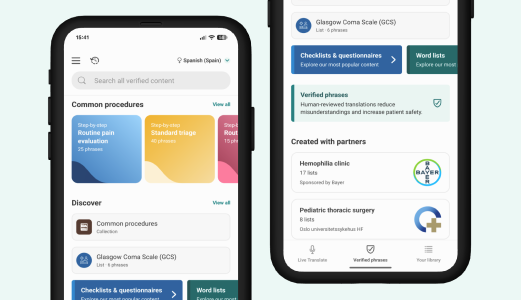
We’ve added a new Shortcuts section to make it even faster to access the features you use most. For now, you’ll find it just above the Discover section on the home screen.

Learn more about the feature
Planned release date:

2026-02-06

Resolved issues in app version 7.1.6

Fix
App
Version
7.1.6
  • We’ve tweaked and improved the overall experience of using Translation History.
  • Fixed issues where archiving and deleting sessions sometimes impacted other sessions as well.
  • The type of logged translation and whether it was a phrase reply or not is indicated more consistently.
Learn more about the feature
Planned release date:

2026-01-19