
Learn more about new updates, features and functionality within our product.
Get email notifications whenever there are new product updates.
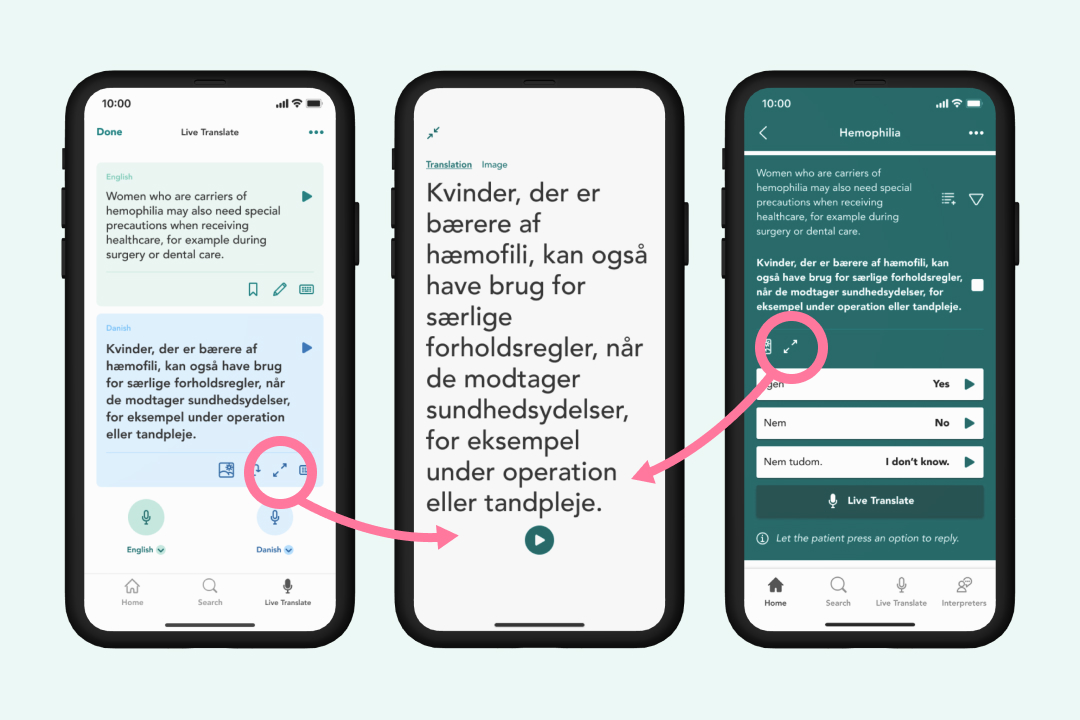
We have added a new option that lets you display translated text in a big font size covering your entire mobile screen. This makes it much easier to show translations directly to patients who have difficulty hearing or who prefer reading the translation themselves. You can also easily switch back and forth between this large text view and supporting medical images with a single tap.
2026-08-13

2026-08-13
2026-07-02
2026-06-29
We have reorganized and simplified the main tabs at the bottom of your screen to help you find translation tools faster. By grouping features into three clear sections – Live Translate, Verified phrases, and Your library (previously called Home)– you can navigate the app with fewer taps and less clutter. With this change we have also moved Recently used lists from Your library to Verified phrases.
2026-06-29
We have added Cantonese to our language translation options. It is available as in both text to speech and speech to text (although not yet verified).
2026-06-29
To improve security and ensure authorized access, members of organizations using Single Sign-On (SSO) will now need to log in once every 24 hours. This update keeps patient data safer by automatically ending inactive sessions after one day, requiring a quick re-authentication at the start of your shift.
2026-06-22

We have improved the experience in hands-free mode to now incorporate more than two people speaking the same, or different languages. The improved workflow also automatically highlights officially verified medical translations with a protective shield icon, giving you complete confidence in the accuracy of your clinical exchanges.
2026-06-22
Managing your team's translation settings is now much simpler and more intuitive. We have renamed the translation package settings ("Configure translation packages available in portal/app") to match exactly what you see on the mobile app, ensuring a consistent experience across all your devices. Additionally, we have added helpful explanatory text bubbles you can hover over to guide you through your options, so you always know exactly what each setting does without any guesswork.
2026-06-18
We have updated the administrator dashboard to make managing healthcare organizations smoother and less cluttered. Setting names have been rephrased into plain language, such as changing SessionLogging to Translation history, and we have added twelve new contextual explanatory pop-up text bubbles to guide you. We also cleaned up status badges and removed inaccurate setup indicators to ensure you always see reliable, easy-to-read information.
2026-06-18