Product news

Learn more about new updates, features and functionality within our product.

Subscribe to updates

Get email notifications whenever there are new product updates.

Discover the latest product news

Reset all filters
Thank you! Your submission has been received!
Oops! Something went wrong while submitting the form.

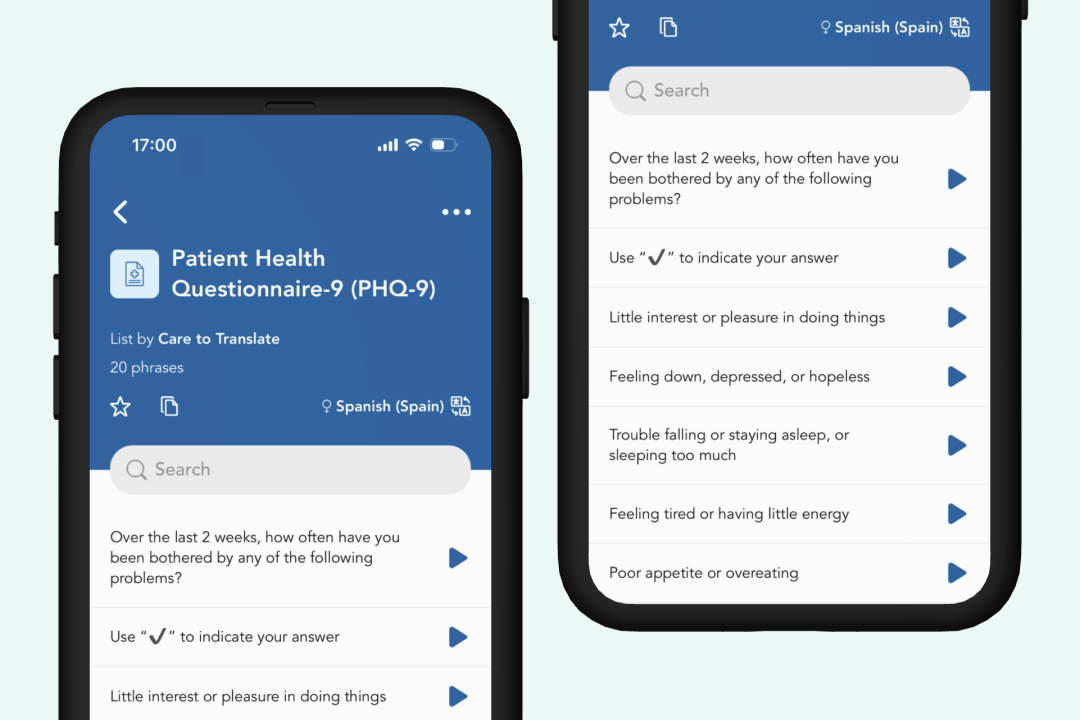
New content: Use the PHQ-9 in the app

New
App
Version
Version 26.2.4

The Patient Health Questionnaire-9 (PHQ-9) is now available directly in Care to Translate. Healthcare professionals can select an available language and guide patients through the nine-item depression screening without switching between different tools.

The PHQ-9 supports screening and symptom monitoring but does not replace a full clinical assessment. Responses, particularly those indicating thoughts of death or self-harm, must be followed up according to the organisation’s established clinical and emergency procedures.

Learn more about the feature
Planned release date:

2026-09-02

Resolved issues in app version 26.2.4

Fix
App
Version
26.2.4
  • Fixed a bug in hands-free mode where the text-to-speech did not take verified segments into account.
  • Fixed the Discover content section cards (Verified phrases tab) that looked broken while loading.

Learn more about the feature
Planned release date:

2026-09-02

Create and edit shared lists directly in the app

Improvement
App
Version
26.2.4

Users who already have permission to create and edit shared lists in the Portal can now do so directly within the app. This streamlines management for admins who need to make changes on the go without logging into the Portal.

  • Eligibility: Available to Account Admins and Organization Admins.
  • Standard view unchanged: Regular app users and accounts using shared credentials will continue to see the app interface as before.
Learn more about the feature
Planned release date:

2026-09-02

Streamlined login flow

Improvement
App
Version
26.2.4

We have refreshed the visual design of our login and registration screens to provide a cleaner entry experience. As part of this update, Single Sign-On (SSO) buttons have been removed from the main landing page and are now exclusively available right where you need them – directly on the login and sign-up screens.

Learn more about the feature
Planned release date:

2026-09-02

Hands-free mode improvements

Improvement
App
Version
26.2.4

We have continued to refine the hands-free mode interface to deliver a faster, more intuitive user experience:

  • Minimized loading times when activating your microphone or ending a hands-free session.
  • Enhanced the visual and audio feedback to make interacting with the feature feel smoother and more responsive overall.
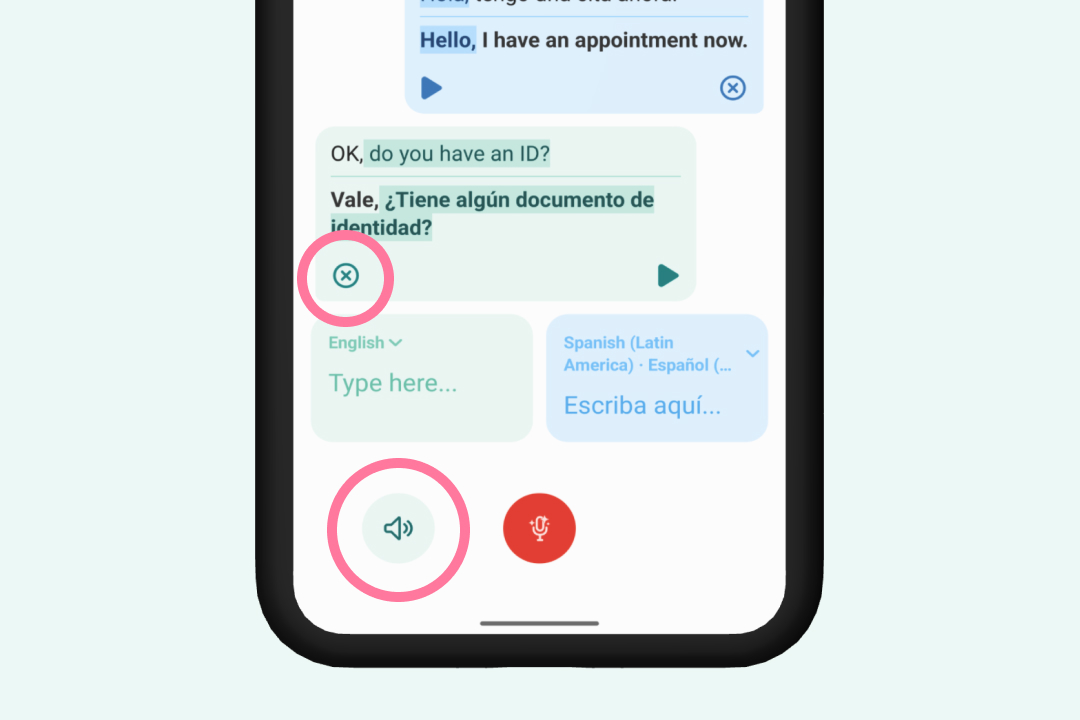
  • Added the possibility to remove the message bubbles, for example if you want to cancel a transcription where you identify a typo. Messages that have been translated will still remain in your translation history.
  • Added a shortcut to automatically play the translation audio.
Learn more about the feature
Planned release date:

2026-09-02

Resolved issues in app version 26.2.3

Fix
App
Version
26.2.3
  • We resolved an issue where some users experienced screen freezes or could not access the application properly after their free trial period expired.
  • We also fixed a technical issue that caused the application to close unexpectedly when users tapped the done button while the hands-free voice reader was actively speaking.
Learn more about the feature
Planned release date:

2026-08-20

New settings to manage newsletter and update subscriptions

Improvement
Version
26.2.3

We have simplified how you manage your subscription preferences for our newsletters and product updates. You can now easily opt-in or opt-out of these communications directly from the mobile app settings. Just go to the menu > your profile > toggle "Marketing emails" on of off.

Learn more about the feature
Planned release date:

2026-08-20

Full screen translation view

Improvement
App
Version
26.2.2

We have added a new option that lets you display translated text in a big font size covering your entire mobile screen. This makes it much easier to show translations directly to patients who have difficulty hearing or who prefer reading the translation themselves. You can also easily switch back and forth between this large text view and supporting medical images with a single tap.

Learn more about the feature
Planned release date:

2026-08-13

Resolved issues in app version 26.2.2

Fix
App
Version
26.2.2
  • We resolved an issue on the login screen where the system would allow you to submit a password reset request even if the confirmation field was left blank.
  • Smaller technical improvements.
Learn more about the feature
Planned release date:

2026-08-13

Resolved issues in Portal version 1.3.3

Fix
Portal
Version
1.3.3
  • We have updated the translation usage dashboard to make your reporting clearer and easier to read. Previously, languages were displayed as technical codes ("nb" and "fil"). They are now shown by their actual names, "Norwegian" and "Tagalog," so you can quickly identify which languages your patients need most.
  • We resolved an issue where the login page would freeze if you tried to log in after visiting the password reset screen. You can now navigate back and forth during the login process without any interruptions.
Learn more about the feature
Planned release date:

2026-07-02