Product news

Learn more about new updates, features and functionality within our product.

Coming soon: Hands-free mode

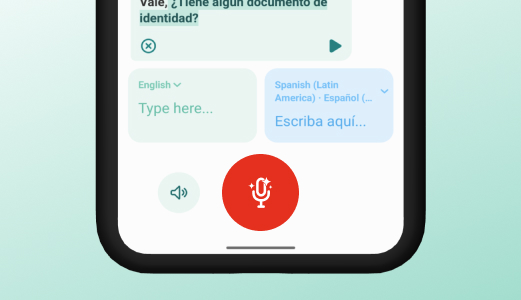
Speak naturally without touching the device. The app listens and automatically manages turn-taking between both spoken languages, creating a smooth, real-time conversation flow. This makes communication faster, safer, and more practical in busy care situations where your hands are occupied.

Upcoming

Upcoming releases

  • Adding custom phrases in the Portal
  • Hands-free mode
  • Scan and translate images

Subscribe to updates

Get email notifications whenever there are new product updates.

Discover the latest product news

Reset all filters
Thank you! Your submission has been received!
Oops! Something went wrong while submitting the form.

Smarter search results

Improvement
App
Version
7.2.3

We’ve upgraded our search model to help you find exactly what you're looking for. We are rolling this out across all languages continuously, so you’ll see improvements appearing bit by bit.

Learn more about the feature
Planned release date:

2026-03-19

Resolved issues in app version 7.2.3

Fix
App
Version
7.2.3
  • More reliable voice typing: Our speech-to-text is now more stable and stays ready to go, even if the app has been running in the background.
Learn more about the feature
Planned release date:

2026-03-19

Improved speech-to-text in Live Translate

Improvement
App
Version
7.2.2

We’ve overhauled how the app handles voice recording to make your experience feel faster and more natural. No more waiting – just tap and talk!

  • Zero-delay recording: You can now start speaking the exact moment you press the microphone. We’ve removed the "loading" pause by capturing your voice locally while the app connects in the background, ensuring not a single word is missed.
  • Instant audio cues: We’ve optimized our "start sounds" to play instantly without any lag, even while the microphone is active, giving you immediate confirmation that the app is listening.
  • Smoother voice sessions: By pre-loading sounds and streamlining microphone permissions, the app now handles consecutive voice translations seamlessly, removing those tiny "hiccups" between recordings.
Learn more about the feature
Planned release date:

2026-03-16

Resolved issues in app version 7.2.2

Fix
App
Version
7.2.2
  • Improved the "Stop recording" button to prevent errors or freezes if it is pressed multiple times.
  • Fixed a bug on iOS where navigating back from a live translation would sometimes lead to a blank screen.
Learn more about the feature
Planned release date:

2026-03-16

Introducing Enterprise SSO

New
App
Version
7.2.0

We’re making it even easier and more secure for organizations to use Care to Translate. With our latest update, you can now connect your centralized single sign-on (SSO) provider directly to the app. This ensures all end-users authenticate through this system when logging in.

Learn more about the feature
Planned release date:

2026-03-05

Resolved issues in app version 7.2.0

Fix
App
Version
7.2.0
  • Fixed a layout bug where the bottom of the search screen was being cut off or spaced incorrectly.
  • Fixed a "navigation trap" on iOS where users getting a reply would get stuck in a loop and couldn't get back to the home screen.
  • Resolved an annoying keyboard flicker that happened on iOS when typing in certain input fields.
  • Fixed a bug in the web app where the "Continue" button disappeared while a new user was trying out their first list.
  • Tweaked the design of the translation bar so the icons don't look cramped when the reply section is hidden.
  • Ensured that web app users are automatically sent back to the main menu immediately after they unlock a new language.
  • Fixed a bug in the sign-up process on iOS where the screen would sometimes freeze up after a user picked their first language.
Learn more about the feature
Planned release date:

2026-03-05

Enhanced list management

Improvement
App
Version
7.2.0

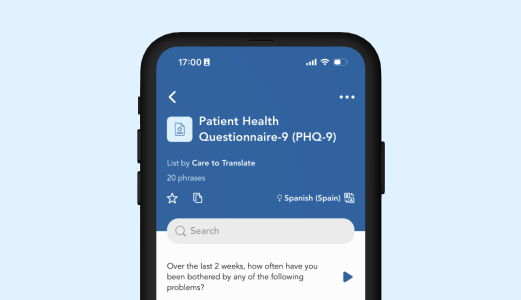
We have redesigned the process for adding and managing content within personal lists. This update introduces an "in-context" workflow, allowing you to build and edit lists without navigating away to the search tab.

Add phrases in-context

Tapping the "Add phrases" button now opens a window directly within your list view.

  • Integrated search: Search for phrases or browse content groups using the familiar search structure.
  • Direct selection: Each phrase now features an Add icon instead of a play button, allowing for immediate addition to your list.

Navigation & UI improvements

  • Action menu: Adding phrases is now also accessible via the top-right menu (...) within any personal list.
  • Edit list button: An "Edit list" button now appears below the "Add phrases" button once phrases have been added to a list.
  • Empty states: Shared lists without phrases now display a clear status message: "This list is empty. Add phrases to it in the admin portal."

System feedback

We have added new notifications to confirm user actions:

  • List copied
  • Phrase removed
Learn more about the feature
Planned release date:

2026-03-05

Identify spoken languages automatically

New
App
Version
7.2.0

We have launched the first version of our language detection feature to simplify your workflow when you aren't sure which language is being spoken.

How it works:

You’ll now find Detect language placed inside the target language picker. Record a few seconds of speech, and the app will analyze the audio to suggest the most likely languages. To keep the experience simple, we currently present up to the top three results.

Confidence scores:

Each suggested language is accompanied by a colored pill showing a percentage (e.g., 90%).

  • What it means: This is a "confidence score" determined by the model.
  • Smart filtering: To ensure you only see relevant options, we automatically filter out any languages with a confidence score below 0.5%.
Learn more about the feature
Planned release date:

2026-03-05

Pick your own list icons

Improvement
App
Version
7.2.0

You can now customize your personal lists with icons. Tap the icon in any personal list (in list or edit view) to select a new one from our full icon library – the same one available in the Portal.

Learn more about the feature
Planned release date:

2026-03-05

Starred areas

Improvement
App
Version
7.2.0

It's now possible to star Areas, thereby adding them to the "Your lists" section on the home screen. Areas now also display the language picker the way lists do.

Learn more about the feature
Planned release date:

2026-03-05